
Fixing Invalid Values in Minecraft Configuration Screens
Diagnose invalid configuration values by checking formats, ranges, identifiers, and safe reset options.
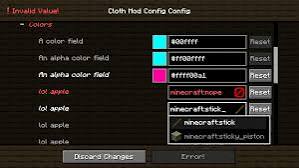
Identify the entry that failed validation
An invalid-value message usually points to an entry that does not meet an expected rule. Read the field label and error text before changing nearby settings. The featured interface shows the kind of feedback a configuration screen may provide, rather than a universal error message.
Check the expected format
Numbers may have limits, identifiers may require a specific form, and colors may use a particular notation. Follow the instructions supplied by the mod. Remove accidental spaces or unsupported characters only when doing so matches the documented format.
Reset the smallest relevant scope
If the correct value is unclear, use a per-entry default where available. Inspect whether the reset control affects one value, a category, or the whole configuration. Preserve unrelated preferences by avoiding a broad reset before it is necessary.
Confirm that the correction persists
Save using the interface controls and reopen the screen to verify the accepted value. If the problem returns, check whether another profile or external edit is involved. Back up configuration files before editing them directly, and close the game while making file-level changes.